Sample application of Spring Data JDBC for ScalarDB with Microservice Transactions
This tutorial describes how to create a sample Spring Boot application for microservice transactions by using Spring Data JDBC for ScalarDB.
For details about these features, see Two-phase Commit Transactions and Guide of Spring Data JDBC for ScalarDB.
Prerequisites
- Java (OpenJDK 8 or higher)
- Gradle
- Docker, Docker Compose
In addition, you need access to the ScalarDB SQL GitHub repository and Packages in ScalarDB SQL repository. These repositories are available only to users with a commercial license and permission. To get a license and permission, please contact us.
You also need the gpr.user property for your GitHub username and the gpr.key property for your personal access token.
You must either add these properties in ~/.gradle/gradle.properties or specify the properties by using the -P option when running the ./gradlew command as follows:
$ ./gradlew run ... -Pgpr.user=<YOUR_GITHUB_USERNAME> -Pgpr.key=<YOUR_PERSONAL_ACCESS_TOKEN>
Or you can also use environment variables, USERNAME for your GitHub username and TOKEN for your personal access token.
$ export USERNAME=<YOUR_GITHUB_USERNAME>
$ export TOKEN=<YOUR_PERSONAL_ACCESS_TOKEN>
For more details, see Install - ScalarDB SQL.
Sample application
Overview
This tutorial describes how to create a Spring Boot sample application for microservice transactions for the same use case as ScalarDB Sample but by using Two-phase Commit Transactions in ScalarDB.
There are two microservices called the Customer Service and the Order Service based on the Database-per-service pattern in this sample application.
The Customer Service manages customers' information including credit card information like a credit limit and a credit total. The Order Service is responsible for order operations like placing an order and getting order histories. Each service has gRPC endpoints. Clients call the endpoints, and the services call the endpoints each other as well. The Customer Service and the Order Service use MySQL and Cassandra through ScalarDB, respectively.
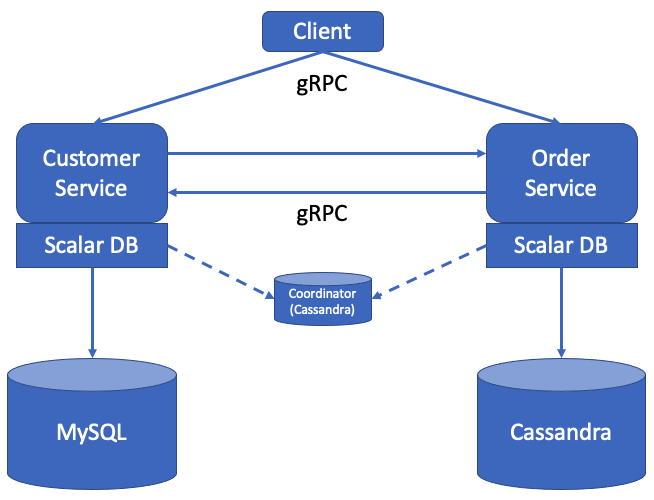
Note that both services access a small coordinator database used for the Consensus Commit protocol. The coordinator database is service-independent and exists for managing transaction metadata for Consensus Commit in a highly available manner. We believe the architecture does not spoil the benefits of the database-per-service pattern. NOTE: We also plan to create a microservice container for the coordinator database to truly achieve the database-per-service pattern.
In this sample application, for ease of setup and explanation, we co-locate the coordinator database in the same Cassandra instance of the Order Service, but of course, the coordinator database can be managed as a separate database.
Also, note that application-specific error handling, authentication processing, etc., are omitted in the sample application since it focuses on explaining how to use ScalarDB. Please see this document for the details of how to handle exceptions in ScalarDB.
Additionally, you assume each service has one container in this sample application to avoid considering request routing between the services. However, for production, because each service typically has multiple servers (or hosts) for scalability and availability, please consider to use ScalarDB Cluster which easily addresses request routing between the services in Two-phase Commit Transactions. Please see this document for the details of Request Routing in Two-phase Commit Transactions.
Schema
The schema is as follows:
CREATE COORDINATOR TABLES IF NOT EXIST;

CREATE NAMESPACE IF NOT EXISTS customer_service;

CREATE TABLE IF NOT EXISTS customer_service.customers (
  customer_id INT PRIMARY KEY,
  name TEXT,
  credit_limit INT,
  credit_total INT
);

CREATE NAMESPACE IF NOT EXISTS order_service;

CREATE TABLE IF NOT EXISTS order_service.orders (
  customer_id INT,
  timestamp BIGINT,
  order_id TEXT,
  PRIMARY KEY (customer_id, timestamp)
);

CREATE INDEX IF NOT EXISTS ON order_service.orders (order_id);

CREATE TABLE IF NOT EXISTS order_service.statements (
  order_id TEXT,
  item_id INT,
  count INT,
  PRIMARY KEY (order_id, item_id)
);

CREATE TABLE IF NOT EXISTS order_service.items (
  item_id INT PRIMARY KEY,
  name TEXT,
  price INT
);
All the tables are created in the customer_service and order_service namespaces.
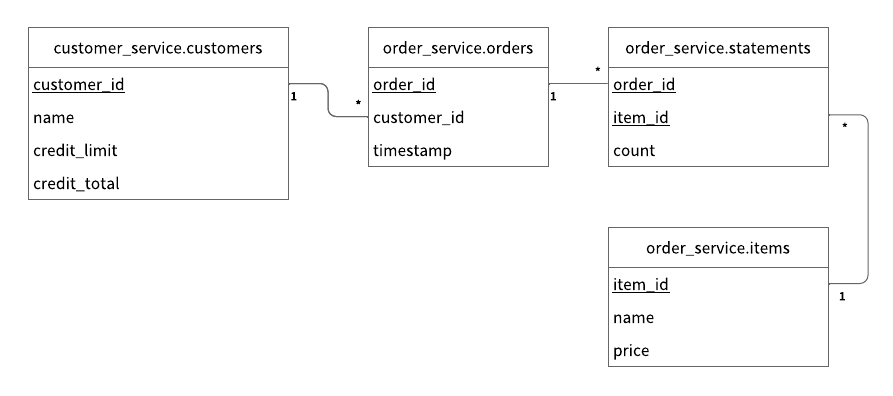
customer_service.customers: a table that manages customers' informationcredit_limit: the maximum amount of money a lender will allow each customer to spend when using a credit cardcredit_total: the amount of money that each customer has already spent by using the credit card
order_service.orders: a table that manages order informationorder_service.statements: a table that manages order statement informationorder_service.items: a table that manages information of items to be ordered
The Entity Relationship Diagram for the schema is as follows:
Service endpoints
The endpoints defined in the services are as follows:
-
Customer Service
getCustomerInfopaymentpreparevalidatecommitrollbackrepayment
-
Order Service
placeOrdergetOrdergetOrders
What you can do in this sample application
The sample application supports the following types of transactions:
- Get customer information through the
getCustomerInfoendpoint of the Customer Service. - Place an order by using a line of credit through the
placeOrderendpoint of the Order Service and thepayment,prepare,validate,commit, androllbackendpoints of the Customer Service.- Checks if the cost of the order is below the customer's credit limit.
- If the check passes, records the order history and updates the amount the customer has spent.
- Get order information by order ID through the
getOrderendpoint of the Order Service and thegetCustomerInfo,prepare,validate,commit, androllbackendpoints of the Customer Service. - Get order information by customer ID through the
getOrdersendpoint of the Order Service and thegetCustomerInfo,prepare,validate,commit, androllbackendpoints of the Customer Service. - Make a payment through the
repaymentendpoint of the Customer Service.- Reduces the amount the customer has spent.
The getCustomerInfo endpoint works as a participant service endpoint when receiving a transaction ID from the coordinator.
Configuration
The configuration for the Customer Service is as follows:
spring.datasource.driver-class-name=com.scalar.db.sql.jdbc.SqlJdbcDriver
spring.datasource.url=jdbc:scalardb:\
?scalar.db.sql.connection_mode=direct\
&scalar.db.storage=multi-storage\
&scalar.db.multi_storage.storages=cassandra,mysql\
&scalar.db.multi_storage.storages.cassandra.storage=cassandra\
&scalar.db.multi_storage.storages.cassandra.contact_points=cassandra\
&scalar.db.multi_storage.storages.cassandra.username=cassandra\
&scalar.db.multi_storage.storages.cassandra.password=cassandra\
&scalar.db.multi_storage.storages.mysql.storage=jdbc\
&scalar.db.multi_storage.storages.mysql.contact_points=jdbc:mysql://mysql:3306/\
&scalar.db.multi_storage.storages.mysql.username=root\
&scalar.db.multi_storage.storages.mysql.password=mysql\
&scalar.db.multi_storage.namespace_mapping=customer_service:mysql,order_service:cassandra,coordinator:cassandra\
&scalar.db.multi_storage.default_storage=mysql\
&scalar.db.sql.default_transaction_mode=two_phase_commit_transaction\
&scalar.db.consensus_commit.isolation_level=SERIALIZABLE
scalar.db.sql.connection_mode: This configuration decides how to connect to ScalarDB.scalar.db.storage: Specifyingmulti-storageis necessary to use Multi-storage Transactions in ScalarDB.scalar.db.multi_storage.storages: Your storage names must be defined here.scalar.db.multi_storage.storages.cassandra.*: These configurations are for thecassandrastorage, which is one of the storage names defined inscalar.db.multi_storage.storages. You can configure all thescalar.db.*properties for thecassandrastorage here.scalar.db.multi_storage.storages.mysql.*: These configurations are for themysqlstorage, which is one of the storage names defined inscalar.db.multi_storage.storages. You can configure all thescalar.db.*properties for themysqlstorage here.scalar.db.multi_storage.namespace_mapping: This configuration maps the namespaces to the storage. In this sample application, operations forcustomer_servicenamespace tables are mapped to themysqlstorage and operations fororder_servicenamespace tables are mapped to thecassandrastorage. You can also define which storage is mapped for thecoordinatornamespace that is used in Consensus Commit transactions.scalar.db.multi_storage.default_storage: This configuration sets the default storage that is used for operations on unmapped namespace tables.scalar.db.sql.default_transaction_mode: Specifyingtwo_phase_commit_transactionis necessary to use Two-Phase Commit Transactions mode in ScalarDB.scalar.db.consensus_commit.isolation_level: This configuration decides the isolation level used for ConsensusCommit.
For details, please see Configuration - Multi-storage Transactions.
The configuration for the Order Service is as follows:
spring.datasource.driver-class-name=com.scalar.db.sql.jdbc.SqlJdbcDriver
spring.datasource.url=jdbc:scalardb:\
?scalar.db.sql.connection_mode=direct\
&scalar.db.storage=cassandra\
&scalar.db.contact_points=cassandra\
&scalar.db.username=cassandra\
&scalar.db.password=cassandra\
&scalar.db.sql.default_namespace_name=order_service\
&scalar.db.sql.default_transaction_mode=two_phase_commit_transaction\
&scalar.db.consensus_commit.isolation_level=SERIALIZABLE
scalar.db.storage:cassandrais specified since this servcise uses only Cassandra as an underlying database.scalar.db.contact_points: This configuration specifies the contact points (e.g., host) for connecting to Cassandra.scalar.db.username: This configuration specifies the username for connecting to Cassandra.scalar.db.password: This configuration specifies the password for connecting to Cassandra.scalar.db.sql.default_namespace_name: This configuration sets the default namespace toorder_service, eliminating the need for the application to specify namespaces.scalar.db.sql.default_transaction_mode: Specifyingtwo_phase_commit_transactionis necessary to use Two-Phase Commit Transactions mode in ScalarDB.scalar.db.consensus_commit.isolation_level: This configuration decides the isolation level used for ConsensusCommit.
Setup
Start Cassandra and MySQL
To start Cassandra and MySQL, you need to run the following docker-compose command:
$ docker-compose up -d cassandra mysql
Please note that you need to wait around more than one minute for the containers to be fully started.
Load schema
You then need to apply the schema with the following command.
To download the CLI tool, scalardb-sql-cli-<VERSION>-all.jar, see the Releases of ScalarDB SQL and download the version that you want to use.
$ java -jar scalardb-sql-cli-<VERSION>-all.jar --config scalardb-sql.properties --file schema.sql
Start Microservices
First, you need to build the docker images of the sample application with the following command:
$ ./gradlew docker
Then, you can start the microservices with the following docker-compose command:
$ docker-compose up -d customer-service order-service
Initial data
When the microservices start, the initial data is loaded automatically.
After the initial data has loaded, the following records should be stored in the tables:
- For the
customer_service.customerstable:
| customer_id | name | credit_limit | credit_total |
|---|---|---|---|
| 1 | Yamada Taro | 10000 | 0 |
| 2 | Yamada Hanako | 10000 | 0 |
| 3 | Suzuki Ichiro | 10000 | 0 |
- For the
order_service.itemstable:
| item_id | name | price |
|---|---|---|
| 1 | Apple | 1000 |
| 2 | Orange | 2000 |
| 3 | Grape | 2500 |
| 4 | Mango | 5000 |
| 5 | Melon | 3000 |
Run the sample application
Let's start with getting information about the customer whose ID is 1:
$ ./gradlew :client:run --args="GetCustomerInfo 1"
...
{"id": 1,"name": "Yamada Taro","credit_limit": 10000}
...
At this time, credit_total isn't shown, which means the current value of credit_total is 0.
Then, place an order for three apples and two oranges by using customer ID 1.
Note that the order format is <Item ID>:<Count>,<Item ID>:<Count>,...:
$ ./gradlew :client:run --args="PlaceOrder 1 1:3,2:2"
...
{"order_id": "415a453b-cfee-4c48-b8f6-d103d3e10bdb"}
...
You can see that running this command shows the order ID.
Let's check the details of the order by using the order ID:
$ ./gradlew :client:run --args="GetOrder 415a453b-cfee-4c48-b8f6-d103d3e10bdb"
...
{"order": {"order_id": "415a453b-cfee-4c48-b8f6-d103d3e10bdb","timestamp": 1686555272435,"customer_id": 1,"customer_name": "Yamada Taro","statement": [{"item_id": 1,"item_name": "Apple","price": 1000,"count": $
,"total": 3000},{"item_id": 2,"item_name": "Orange","price": 2000,"count": 2,"total": 4000}],"total": 7000}}
...
Then, let's place another order and get the order history of customer ID 1:
$ ./gradlew :client:run --args="PlaceOrder 1 5:1"
...
{"order_id": "069be075-98f7-428c-b2e0-6820693fc41b"}
...
$ ./gradlew :client:run --args="GetOrders 1"
...
{"order": [{"order_id": "069be075-98f7-428c-b2e0-6820693fc41b","timestamp": 1686555279366,"customer_id": 1,"customer_name": "Yamada Taro","statement": [{"item_id": 5,"item_name": "Melon","price": 3000,"count": 1,"total": 3000}],"total": 3000},{"order_id": "415a453b-cfee-4c48-b8f6-d103d3e10bdb","timestamp": 1686555272435,"customer_id": 1,"customer_name": "Yamada Taro","statement": [{"item_id": 1,"item_name": "Apple","price": 1000,"count": 3,"total": 3000},{"item_id": 2,"item_name": "Orange","price": 2000,"count": 2,"total": 4000}],"total": 7000}]}
...
This order history is shown in descending order by timestamp.
The customer's current credit_total is 10000.
Since the customer has now reached their credit_limit, which was shown when retrieving their information, they cannot place anymore orders.
$ ./gradlew :client:run --args="GetCustomerInfo 1"
...
{"id": 1,"name": "Yamada Taro","credit_limit": 10000,"credit_total": 10000}
...
$ ./gradlew :client:run --args="PlaceOrder 1 3:1,4:1"
...
io.grpc.StatusRuntimeException: FAILED_PRECONDITION: Credit limit exceeded. creditTotal:10000, payment:7500
        at io.grpc.stub.ClientCalls.toStatusRuntimeException(ClientCalls.java:271)
        at io.grpc.stub.ClientCalls.getUnchecked(ClientCalls.java:252)
        at io.grpc.stub.ClientCalls.blockingUnaryCall(ClientCalls.java:165)
        at sample.rpc.OrderServiceGrpc$OrderServiceBlockingStub.placeOrder(OrderServiceGrpc.java:296)
        at sample.client.command.PlaceOrderCommand.call(PlaceOrderCommand.java:38)
        at sample.client.command.PlaceOrderCommand.call(PlaceOrderCommand.java:12)
        at picocli.CommandLine.executeUserObject(CommandLine.java:2041)
        at picocli.CommandLine.access$1500(CommandLine.java:148)
        at picocli.CommandLine$RunLast.executeUserObjectOfLastSubcommandWithSameParent(CommandLine.java:2461)
        at picocli.CommandLine$RunLast.handle(CommandLine.java:2453)
        at picocli.CommandLine$RunLast.handle(CommandLine.java:2415)
        at picocli.CommandLine$AbstractParseResultHandler.execute(CommandLine.java:2273)
        at picocli.CommandLine$RunLast.execute(CommandLine.java:2417)
        at picocli.CommandLine.execute(CommandLine.java:2170)
        at sample.client.Client.main(Client.java:39)
...
After making a payment, the customer will be able to place orders again.
$ ./gradlew :client:run --args="Repayment 1 8000"
...
$ ./gradlew :client:run --args="GetCustomerInfo 1"
...
{"id": 1,"name": "Yamada Taro","credit_limit": 10000,"credit_total": 2000}
...
$ ./gradlew :client:run --args="PlaceOrder 1 3:1,4:1"
...
{"order_id": "b6adabd8-0a05-4109-9618-3420fea3161f"}
...
Clean up
To stop Cassandra, MySQL and the Microservices, run the following command:
$ docker-compose down
Reference - How the microservice transaction is achieved
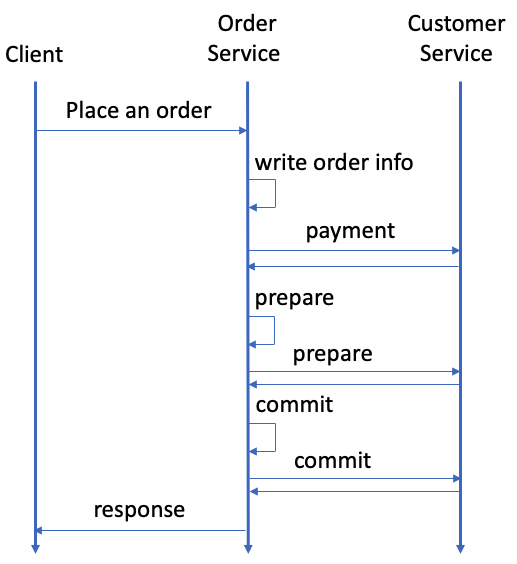
The transactions for placing an order, getting a single order, and getting the history of orders achieve the microservice transaction. This section focuses on how the transactions that span the Customer Service and the Order Service are implemented by placing an order as an example.
The following sequence diagram shows the transaction for placing an order:
1. Transaction with a two-phase commit interface is started
When a client sends a request to place an order to the Order Service, OrderService.placeOrder() is called, and the microservice transaction starts.
At first, the Order Service starts a transaction with a two-phase commit interface with ScalarDbTwoPcRepository.executeTwoPcTransaction() as follows. For reference, see OrderService.java.
// Start a two-phase commit interface transaction
TwoPcResult<String> result = orderRepository.executeTwoPcTransaction(txId -> {
  ...
}, ...);
The actions in CRUD operations are executed, Transaction is committed by using the two-phase commit protocol, and Error handling are automatically performed by the API.
2. CRUD operations are executed
After the transaction with a two-phase commit interface starts, CRUD operations are executed by ScalarDbTwoPcRepository.executeTwoPcTransaction(). The Order Service puts the order information in the order_service.orders table and the detailed information in the order_service.statements table as follows. For reference, see OrderService.java.
// Put the order info into the `orders` table
orderRepository.insert(order);

AtomicInteger amount = new AtomicInteger();
for (ItemOrder itemOrder : request.getItemOrderList()) {
  int itemId = itemOrder.getItemId();
  int count = itemOrder.getCount();
  // Retrieve the item info from the `items` table
  Optional<Item> itemOpt = itemRepository.findById(itemId);
  if (!itemOpt.isPresent()) {
    String message = "Item not found: " + itemId;
    responseObserver.onError(
        Status.NOT_FOUND.withDescription(message).asRuntimeException());
    throw new ScalarDbNonTransientException(message);
  }
  Item item = itemOpt.get();

  int cost = item.price * count;
  // Put the order statement into the `statements` table
  statementRepository.insert(new Statement(itemId, orderId, count));
  // Calculate the total amount
  amount.addAndGet(cost);
}
Then, the Order Service calls the payment gRPC endpoint of the Customer Service along with the transaction ID. For reference, see OrderService.java.
customerServiceStub.payment(
  PaymentRequest.newBuilder()
    .setTransactionId(transactionId)
    .setCustomerId(customerId)
    .setAmount(amount)
    .build());
The payment endpoint of the Customer Service first joins the transaction with ScalarDbTwoPcRepository.joinTransactionOnParticipant() as follows. For reference, see CustomerService.java.
customerRepository.joinTransactionOnParticipant(request.getTransactionId(), ...);
The endpoint then gets the customer information and checks if the customer's credit total exceeds the credit limit after the payment. If the credit total does not exceed the credit limit, the endpoint updates the customer's credit total. For reference, see CustomerService.java.
Customer customer = getCustomer(responseObserver, request.getCustomerId());

int updatedCreditTotal = customer.creditTotal + request.getAmount();
// Check if the credit total exceeds the credit limit after payment
if (updatedCreditTotal > customer.creditLimit) {
  String message = String.format(
      "Credit limit exceeded. creditTotal:%d, payment:%d", customer.creditTotal, request.getAmount());
  responseObserver.onError(
      Status.FAILED_PRECONDITION.withDescription(message).asRuntimeException());
  throw new ScalarDbNonTransientException(message);
}

// Reduce `credit_total` for the customer
customerRepository.update(customer.withCreditTotal(updatedCreditTotal));
3. Transaction is committed by using the two-phase commit protocol
After the Order Service receives the update that the payment succeeded, the Order Service tries to commit the transaction.
The ScalarDbTwoPcRepository.executeTwoPcTransaction() API, which called on the Order Service, automatically performs preparations, validations, and commits of both the local Order Service and the remote Customer Service. These steps are executed sequentially after the above CRUD operations successfully finish. The implementations to invoke prepare, validate, and commit gRPC endpoints of the Customer Service need to be passed as parameters to the API. For reference, see OrderService.java.
TwoPcResult<PlaceOrderResponse> result = orderRepository.executeTwoPcTransaction(txId ->{
    ...
  },

  Collections.singletonList(
    RemotePrepareCommitPhaseOperations.createSerializable(
      this::callPrepareEndpoint,
      this::callValidateEndpoint,
      this::callCommitEndpoint,
      this::callRollbackEndpoint
    )
  )
);
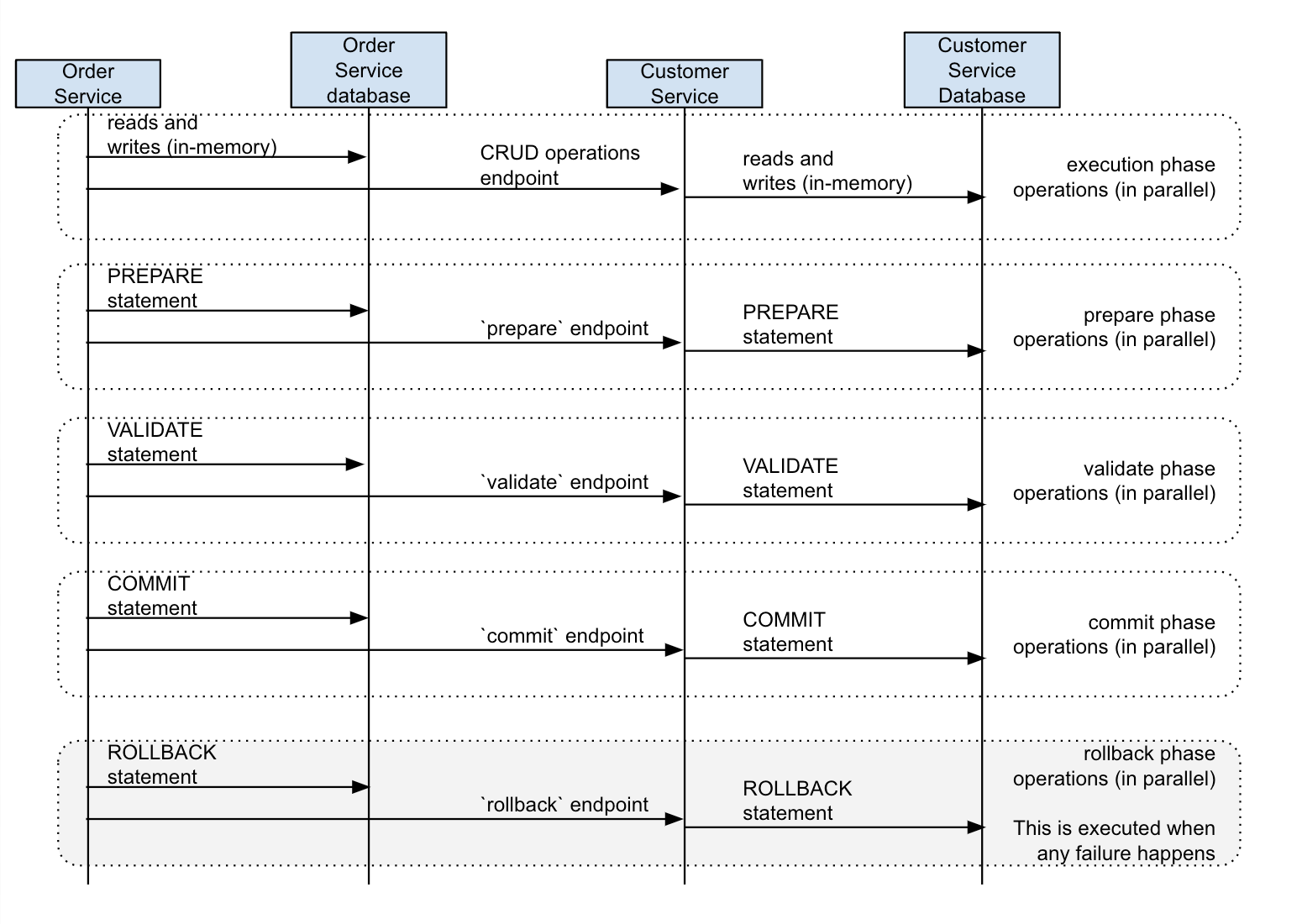
In the prepare endpoint of the Customer Service, the endpoint resumes and prepares the transaction by using ScalarDbTwoPcRepository.prepareTransactionOnParticipant(). For reference, see CustomerService.java.
customerRepository.prepareTransactionOnParticipant(request.getTransactionId());
In the validate endpoint of the Customer Service, the endpoint resumes and validates the transaction by using ScalarDbTwoPcRepository.validateTransactionOnParticipant(). For reference, see CustomerService.java.
customerRepository.validateTransactionOnParticipant(request.getTransactionId());
In the commit endpoint of the Customer Service, the endpoint resumes and commits the transaction by using ScalarDbTwoPcRepository.commitTransactionOnParticipant(). For reference, see CustomerService.java.
customerRepository.commitTransactionOnParticipant(request.getTransactionId());
Error handling
If an error happens while executing a transaction, ScalarDbTwoPcRepository.executeTwoPcTransaction() will automatically roll back the transaction in both the local Order Service and the remote Customer Service. The implementation to invoke the rollback gRPC endpoint of the Customer Service also needs to be passed as a parameter to the API with other ones. For reference, see OrderService.java.
TwoPcResult<PlaceOrderResponse> result = orderRepository.executeTwoPcTransaction(txId ->{
    ...
  },

  Collections.singletonList(
    RemotePrepareCommitPhaseOperations.createSerializable(
      this::callPrepareEndpoint,
      this::callValidateEndpoint,
      this::callCommitEndpoint,
      this::callRollbackEndpoint
    )
  )
);
In the rollback endpoint of the Customer Service, the endpoint resumes and rolls back the transaction. For reference, see CustomerService.java.
customerRepository.rollbackTransactionOnParticipant(request.getTransactionId());
For details about how to handle exceptions in ScalarDB, see Handle exceptions.