Create a Sample Application That Supports Multi-Storage Transactions
This tutorial describes how to create a sample application that supports the multi-storage transactions feature in ScalarDB.
Overview
This tutorial illustrates the process of creating a sample e-commerce application, where items can be ordered and paid for with a line of credit by using the multi-storage transactions feature in ScalarDB.
In this tutorial, you will build an application that uses both Cassandra and MySQL. By using the multi-storage transactions feature in ScalarDB, you can execute a transaction that spans both Cassandra and MySQL.
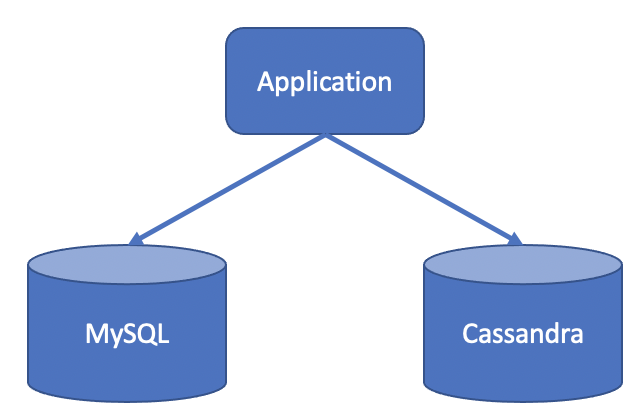
Since the focus of the sample application is to demonstrate using ScalarDB, application-specific error handling, authentication processing, and similar functions are not included in the sample application. For details about exception handling in ScalarDB, see How to handle exceptions.
What you can do in this sample application
The sample application supports the following types of transactions:
- Get customer information.
- Place an order by using a line of credit.
- Checks if the cost of the order is below the customer's credit limit.
- If the check passes, records the order history and updates the amount the customer has spent.
- Get order information by order ID.
- Get order information by customer ID.
- Make a payment.
- Reduces the amount the customer has spent.
Prerequisites for this sample application
- One of the following Java Development Kits (JDKs):
- Oracle JDK 8
- OpenJDK 8 from Eclipse Temurin, Amazon Corretto, or Microsoft
- Docker 20.10 or later with Docker Compose V2 or later
This sample application only works with Java 8. However, ScalarDB itself works with Java LTS versions, which means that you can use Java LTS versions for your application that uses ScalarDB. For details on the requirements of ScalarDB, such as which Java versions can be used, see Requirements.
Set up ScalarDB
The following sections describe how to set up the sample application that supports the multi-storage transactions feature in ScalarDB.
Clone the ScalarDB samples repository
Open Terminal, then clone the ScalarDB samples repository by running the following command:
git clone https://github.com/scalar-labs/scalardb-samples
Then, go to the directory that contains the sample application by running the following command:
cd scalardb-samples/multi-storage-transaction-sample
Start Cassandra and MySQL
Cassandra and MySQL are already configured for the sample application, as shown in database.properties. For details about configuring the multi-storage transactions feature in ScalarDB, see How to configure ScalarDB to support multi-storage transactions.
To start Cassandra and MySQL, which are included in the Docker container for the sample application, make sure Docker is running and then run the following command:
docker-compose up -d
Starting the Docker container may take more than one minute depending on your development environment.
Load the schema
The database schema (the method in which the data will be organized) for the sample application has already been defined in schema.json.
To apply the schema, go to the ScalarDB Releases page and download the ScalarDB Schema Loader that matches the version of ScalarDB that you want to use to the scalardb-samples/multi-storage-transaction-sample folder.
Then, run the following command, replacing <VERSION> with the version of the ScalarDB Schema Loader that you downloaded:
java -jar scalardb-schema-loader-<VERSION>.jar --config database.properties --schema-file schema.json --coordinator
Schema details
As shown in schema.json for the sample application, all the tables are created in the customer and order namespaces.
customer.customers: a table that manages customers' informationcredit_limit: the maximum amount of money a lender will allow each customer to spend when using a line of creditcredit_total: the amount of money that each customer has already spent by using their line of credit
order.orders: a table that manages order informationorder.statements: a table that manages order statement informationorder.items: a table that manages information of items to be ordered
The Entity Relationship Diagram for the schema is as follows:

Load the initial data
After the Docker container has started, load the initial data by running the following command:
./gradlew run --args="LoadInitialData"
After the initial data has loaded, the following records should be stored in the tables.
customer.customers table
| customer_id | name | credit_limit | credit_total |
|---|---|---|---|
| 1 | Yamada Taro | 10000 | 0 |
| 2 | Yamada Hanako | 10000 | 0 |
| 3 | Suzuki Ichiro | 10000 | 0 |
order.items table
| item_id | name | price |
|---|---|---|
| 1 | Apple | 1000 |
| 2 | Orange | 2000 |
| 3 | Grape | 2500 |
| 4 | Mango | 5000 |
| 5 | Melon | 3000 |
Execute transactions and retrieve data in the sample application
The following sections describe how to execute transactions and retrieve data in the sample e-commerce application.
Get customer information
Start with getting information about the customer whose ID is 1 by running the following command:
./gradlew run --args="GetCustomerInfo 1"
You should see the following output:
...
{"id": 1, "name": "Yamada Taro", "credit_limit": 10000, "credit_total": 0}
...
Place an order
Then, have customer ID 1 place an order for three apples and two oranges by running the following command:
The order format in this command is ./gradlew run --args="PlaceOrder <CUSTOMER_ID> <ITEM_ID>:<COUNT>,<ITEM_ID>:<COUNT>,...".
./gradlew run --args="PlaceOrder 1 1:3,2:2"
You should see a similar output as below, with a different UUID for order_id, which confirms that the order was successful:
...
{"order_id": "dea4964a-ff50-4ecf-9201-027981a1566e"}
...
Check order details
Check details about the order by running the following command, replacing <ORDER_ID_UUID> with the UUID for the order_id that was shown after running the previous command:
./gradlew run --args="GetOrder <ORDER_ID_UUID>"
You should see a similar output as below, with different UUIDs for order_id and timestamp:
...
{"order": {"order_id": "dea4964a-ff50-4ecf-9201-027981a1566e","timestamp": 1650948340914,"customer_id": 1,"customer_name": "Yamada Taro","statement": [{"item_id": 1,"item_name": "Apple","price": 1000,"count": 3,"total": 3000},{"item_id": 2,"item_name": "Orange","price": 2000,"count": 2,"total": 4000}],"total": 7000}}
...
Place another order
Place an order for one melon that uses the remaining amount in credit_total for customer ID 1 by running the following command:
./gradlew run --args="PlaceOrder 1 5:1"
You should see a similar output as below, with a different UUID for order_id, which confirms that the order was successful:
...
{"order_id": "bcc34150-91fa-4bea-83db-d2dbe6f0f30d"}
...
Check order history
Get the history of all orders for customer ID 1 by running the following command:
./gradlew run --args="GetOrders 1"
You should see a similar output as below, with different UUIDs for order_id and timestamp, which shows the history of all orders for customer ID 1 in descending order by timestamp:
...
{"order": [{"order_id": "dea4964a-ff50-4ecf-9201-027981a1566e","timestamp": 1650948340914,"customer_id": 1,"customer_name": "Yamada Taro","statement": [{"item_id": 1,"item_name": "Apple","price": 1000,"count": 3,"total": 3000},{"item_id": 2,"item_name": "Orange","price": 2000,"count": 2,"total": 4000}],"total": 7000},{"order_id": "bcc34150-91fa-4bea-83db-d2dbe6f0f30d","timestamp": 1650948412766,"customer_id": 1,"customer_name": "Yamada Taro","statement": [{"item_id": 5,"item_name": "Melon","price": 3000,"count": 1,"total": 3000}],"total": 3000}]}
...
Check credit total
Get the credit total for customer ID 1 by running the following command:
./gradlew run --args="GetCustomerInfo 1"
You should see the following output, which shows that customer ID 1 has reached their credit_limit in credit_total and cannot place anymore orders:
...
{"id": 1, "name": "Yamada Taro", "credit_limit": 10000, "credit_total": 10000}
...
Try to place an order for one grape and one mango by running the following command:
./gradlew run --args="PlaceOrder 1 3:1,4:1"
You should see the following output, which shows that the order failed because the credit_total amount would exceed the credit_limit amount:
...
java.lang.RuntimeException: Credit limit exceeded
        at sample.Sample.placeOrder(Sample.java:205)
        at sample.command.PlaceOrderCommand.call(PlaceOrderCommand.java:33)
        at sample.command.PlaceOrderCommand.call(PlaceOrderCommand.java:8)
        at picocli.CommandLine.executeUserObject(CommandLine.java:1783)
        at picocli.CommandLine.access$900(CommandLine.java:145)
        at picocli.CommandLine$RunLast.handle(CommandLine.java:2141)
        at picocli.CommandLine$RunLast.handle(CommandLine.java:2108)
        at picocli.CommandLine$AbstractParseResultHandler.execute(CommandLine.java:1975)
        at picocli.CommandLine.execute(CommandLine.java:1904)
        at sample.command.SampleCommand.main(SampleCommand.java:35)
...
Make a payment
To continue making orders, customer ID 1 must make a payment to reduce the credit_total amount.
Make a payment by running the following command:
./gradlew run --args="Repayment 1 8000"
Then, check the credit_total amount for customer ID 1 by running the following command:
./gradlew run --args="GetCustomerInfo 1"
You should see the following output, which shows that a payment was applied to customer ID 1, reducing the credit_total amount:
...
{"id": 1, "name": "Yamada Taro", "credit_limit": 10000, "credit_total": 2000}
...
Now that customer ID 1 has made a payment, place an order for one grape and one melon by running the following command:
./gradlew run --args="PlaceOrder 1 3:1,4:1"
You should see a similar output as below, with a different UUID for order_id, which confirms that the order was successful:
...
{"order_id": "8911cab3-1c2b-4322-9386-adb1c024e078"}
...
Stop the sample application
To stop the sample application, stop the Docker container by running the following command:
docker-compose down