Developer Guide for ScalarDB Cluster with the Java API
ScalarDB Cluster provides a Java API for developing applications. This document explains how to use the Java API.
Add ScalarDB Cluster Java Client SDK to your build
The ScalarDB Cluster Java Client SDK is available in the Maven Central Repository.
To add a dependency on the ScalarDB Cluster Java Client SDK by using Gradle, use the following, replacing <X.Y.Z> with the version of the ScalarDB Cluster Java Client SDK that you want to use:
dependencies {
  implementation 'com.scalar-labs:scalardb-cluster-java-client-sdk:<X.Y.Z>'
}
To add a dependency by using Maven, use the following, replacing <X.Y.Z> with the version of the ScalarDB Cluster Java Client SDK that you want to use:
<dependency>
  <groupId>com.scalar-labs</groupId>
  <artifactId>scalardb-cluster-java-client-sdk</artifactId>
  <version><X.Y.Z></version>
</dependency>
Client modes
The ScalarDB Cluster Java Client SDK supports two client modes: indirect and direct-kubernetes. The following describes the client modes.
indirect client mode
This mode simply sends a request to any cluster node (typically via a load balancer, such as Envoy), and the cluster node receiving the request routes the request to the appropriate cluster node that has the transaction state.
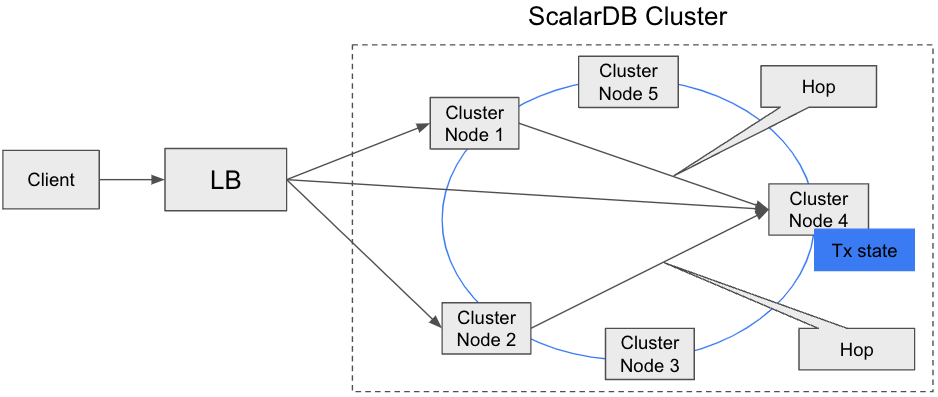
The advantage of this mode is that we can keep the client thin. The disadvantage is that we need an additional hop to reach the correct cluster node, which may affect performance.
You can use this connection mode even if your application is running on a different Kubernetes cluster and your application can't access the Kubernetes API and each cluster node.
If your application is running on the same Kubernetes cluster as your ScalarDB Cluster nodes, you can use the direct-kubernetes client mode.
direct-kubernetes client mode
In this mode, the client uses the membership logic (using the Kubernetes API) and the distribution logic (consistent hashing algorithm) to find the right cluster node that has the transaction state. The client then sends a request to the cluster node directly.
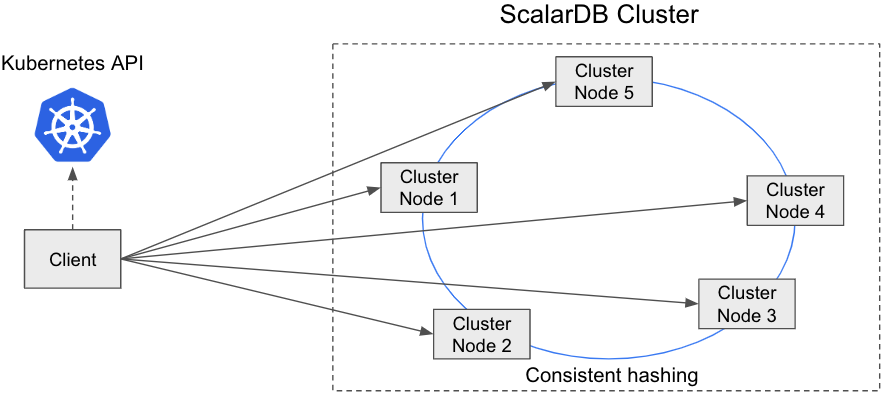
The advantage of this mode is that we can reduce the hop count to reach the proper cluster node, which will improve the performance. The disadvantage of this mode is that we need to make the client fat because the client needs to have membership logic and request-routing logic.
Since this connection mode needs to access the Kubernetes API and each cluster node, you can use this connection mode only if your application is running on the same Kubernetes cluster as your ScalarDB Cluster nodes.
If your application is running on a different Kubernetes cluster, use the indirect client mode.
For details about how to deploy your application on Kubernetes with direct-kubernetes client mode, see Deploy your client application on Kubernetes with direct-kubernetes mode.
Java API references
The ScalarDB Cluster Java Client SDK provides a Java API for applications to access ScalarDB Cluster. The following diagram shows the architecture of the ScalarDB Cluster Java API.
  +------------------+
  | User/Application |
  +------------------+
           ↓ Java API
    +--------------+
    | ScalarDB API |
    +--------------+
           ↓ gRPC
  +------------------+
  | ScalarDB Cluster |
  +------------------+
           ↓ DB vendor–specific protocol
         +----+
         | DB |
         +----+
Detailed Java API references for ScalarDB Cluster are available in ScalarDB Cluster Java API Guide.
The following section describes the Schema Loader for ScalarDB Cluster.
ScalarDB Cluster Schema Loader
To load a schema via ScalarDB Cluster, use the dedicated ScalarDB Cluster Schema Loader. Using ScalarDB Cluster Schema Loader is the same as using ScalarDB Schema Loader, except that the artifact name is different.
Download the version of the ScalarDB Cluster Schema Loader that matches the version of ScalarDB Cluster that you're using from ScalarDB Releases, and run it as follows, replacing <X.Y.Z> with that version:
java -jar scalardb-cluster-schema-loader-<X.Y.Z>-all.jar --config <PATH_TO_SCALARDB_PROPERTIES_FILE> --schema-file <PATH_TO_SCHEMA_FILE> --coordinator
You can also use the container image from the Scalar container registry, replacing <X.Y.Z> with the version of the ScalarDB Cluster Schema Loader that you want to use:
docker run --rm -v <PATH_TO_YOUR_LOCAL_SCALARDB_PROPERTIES_FILE>:/scalardb.properties -v <PATH_TO_YOUR_LOCAL_SCHEMA_FILE>:/schema.json ghcr.io/scalar-labs/scalardb-cluster-schema-loader:<X.Y.Z> --config /scalardb.properties --schema-file /schema.json --coordinator
ScalarDB Cluster SQL in Java
ScalarDB Cluster also provides Java access to ScalarDB Cluster SQL through JDBC and Spring Data JDBC for ScalarDB. The following diagram shows how ScalarDB Cluster SQL is accessed.
  +-----------------------------------------+
  |            User/Application             |
  +-----------------------------------------+
         ↓                    ↓ Java API
Java API ↓     +-------------------------------+
 (JDBC)  ↓     | Spring Data JDBC for ScalarDB |
         ↓     +-------------------------------+
+----------------------------------------------+
|         ScalarDB JDBC (ScalarDB SQL)         |
+----------------------------------------------+
                    ↓ gRPC
         +----------------------+
         | ScalarDB Cluster SQL |
         +----------------------+
                    ↓ DB vendor–specific protocol
                  +----+
                  | DB |
                  +----+
ScalarDB Cluster SQL via JDBC
Using ScalarDB Cluster SQL via JDBC is almost the same as using ScalarDB JDBC, except that you need to add ScalarDB Cluster dependencies.
To add the dependencies by using Gradle, use the following, replacing <X.Y.Z> with the versions of the ScalarDB SQL JDBC driver and the ScalarDB Cluster Java Client SDK that you want to use:
dependencies {
  implementation 'com.scalar-labs:scalardb-sql-jdbc:<X.Y.Z>'
  implementation 'com.scalar-labs:scalardb-cluster-java-client-sdk:<X.Y.Z>'
}
To add the dependencies by using Maven, use the following, replacing <X.Y.Z> with the versions of the ScalarDB SQL JDBC driver and the ScalarDB Cluster Java Client SDK that you want to use:
<dependencies>
  <dependency>
    <groupId>com.scalar-labs</groupId>
    <artifactId>scalardb-sql-jdbc</artifactId>
    <version><X.Y.Z></version>
  </dependency>
  <dependency>
    <groupId>com.scalar-labs</groupId>
    <artifactId>scalardb-cluster-java-client-sdk</artifactId>
    <version><X.Y.Z></version>
  </dependency>
</dependencies>
For details, see ScalarDB JDBC Guide.
ScalarDB Cluster SQL via Spring Data JDBC for ScalarDB
Using ScalarDB Cluster SQL via Spring Data JDBC for ScalarDB is almost the same as using Spring Data JDBC for ScalarDB, except that you need to add ScalarDB Cluster dependencies.
To add the dependencies by using Gradle, use the following, replacing <X.Y.Z> with the versions of Spring Data JDBC for ScalarDB and the ScalarDB Cluster Java Client SDK that you want to use:
dependencies {
  implementation 'com.scalar-labs:scalardb-sql-spring-data:<X.Y.Z>'
  implementation 'com.scalar-labs:scalardb-cluster-java-client-sdk:<X.Y.Z>'
}
To add the dependencies by using Maven, use the following, replacing <X.Y.Z> with the versions of Spring Data JDBC for ScalarDB and the ScalarDB Cluster Java Client SDK that you want to use:
<dependencies>
  <dependency>
    <groupId>com.scalar-labs</groupId>
    <artifactId>scalardb-sql-spring-data</artifactId>
    <version><X.Y.Z></version>
  </dependency>
  <dependency>
    <groupId>com.scalar-labs</groupId>
    <artifactId>scalardb-cluster-java-client-sdk</artifactId>
    <version><X.Y.Z></version>
  </dependency>
</dependencies>
For details, see Guide of Spring Data JDBC for ScalarDB.
ScalarDB Cluster SQL CLI
Like other SQL databases, ScalarDB SQL provides a CLI tool where you can issue SQL statements interactively in a command-line shell.
Download the version of the ScalarDB Cluster SQL CLI that matches the version of ScalarDB Cluster that you're using from ScalarDB Releases, and run it as follows, replacing <X.Y.Z> with that version:
java -jar scalardb-cluster-sql-cli-<X.Y.Z>-all.jar --config <PATH_TO_SCALARDB_SQL_PROPERTIES_FILE>
You can also use the container image from the Scalar container registry, replacing <X.Y.Z> with the version of the ScalarDB Cluster SQL CLI that you want to use:
docker run --rm -it -v <PATH_TO_YOUR_LOCAL_SCALARDB_SQL_PROPERTIES_FILE>:/scalardb-sql.properties ghcr.io/scalar-labs/scalardb-cluster-sql-cli:<X.Y.Z> --config /scalardb-sql.properties
Usage
You can see the CLI usage with the -h option as follows:
java -jar scalardb-cluster-sql-cli-<X.Y.Z>-all.jar -h
Usage: scalardb-sql-cli [-hs] -c=PROPERTIES_FILE [-e=COMMAND] [-f=FILE]
                        [-l=LOG_FILE] [-o=<outputFormat>] [-p=PASSWORD]
                        [-u=USERNAME]
Starts ScalarDB SQL CLI.
  -c, --config=PROPERTIES_FILE
                            A configuration file in properties format.
  -e, --execute=COMMAND     A command to execute.
  -f, --file=FILE           A script file to execute.
  -h, --help                Display this help message.
  -l, --log=LOG_FILE        A file to write output.
  -o, --output-format=<outputFormat>
                            Format mode for result display. You can specify
                              table/vertical/csv/tsv/xmlattrs/xmlelements/json/a
                              nsiconsole.
  -p, --password=PASSWORD   A password to connect.
  -s, --silent              Reduce the amount of informational messages
                              displayed.
  -u, --username=USERNAME   A username to connect.
Further reading
If you want to use ScalarDB Cluster in programming languages other than Java, you can use the ScalarDB Cluster gRPC API. For details, refer to the following:
JavaDocs are also available: