Guide of Spring Data JDBC for ScalarDB
Directly using the ScalarDB API may be difficult because you need to write a lot of code and consider how and when to call the APIs (e.g., rollback() and commit()) for transactions. Since we assume most ScalarDB users develop their applications in Java, you can take advantage of the Spring Framework, which is one of the most popular application frameworks for developing in Java. By using Spring Data JDBC for ScalarDB, you can streamline development by using a familiar framework.
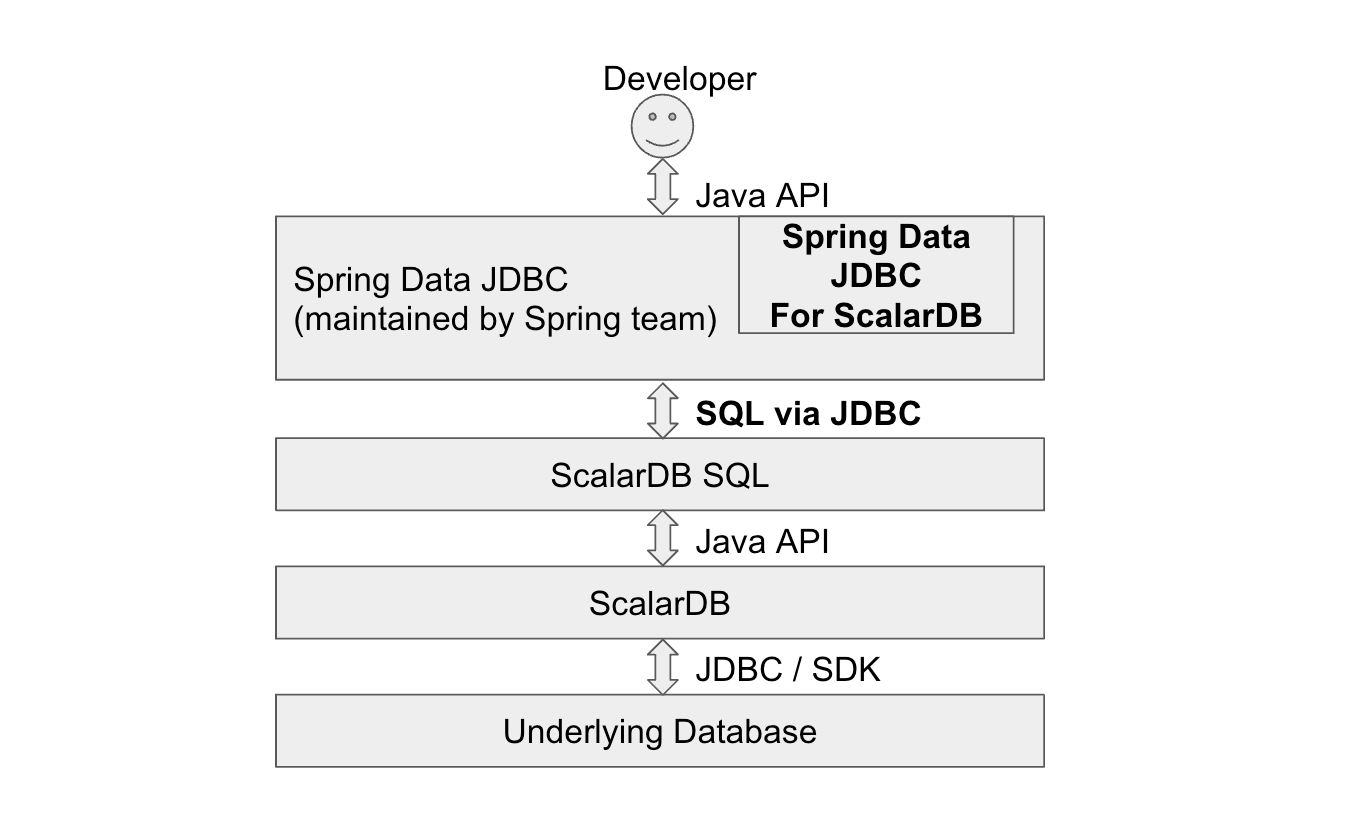
The usage of Spring Data JDBC for ScalarDB basically follows Spring Data JDBC - Reference Documentation. This guide describes several important topics to use Spring Data JDBC for ScalarDB and its limitations.
Spring Data JDBC for ScalarDB extends Spring Data JDBC, but full compatibility is not guaranteed. Only the features listed on this page are officially tested and supported.
Add Spring Data JDBC for ScalarDB to your project
To add the dependencies on Spring Data JDBC for ScalarDB by using Gradle, use the following, replacing <VERSION> with the versions of Spring Data JDBC for ScalarDB and the related library, respectively, that you are using:
dependencies {
    implementation 'com.scalar-labs:scalardb-sql-spring-data:<VERSION>'
    implementation 'com.scalar-labs:scalardb-cluster-java-client-sdk:<VERSION>'
}
To add the dependencies by using Maven, use the following, replacing ... with the version of Spring Data JDBC for ScalarDB that you are using:
<dependencies>
    <dependency>
        <groupId>com.scalar-labs</groupId>
        <artifactId>scalardb-sql-spring-data</artifactId>
        <version>...</version>
    </dependency>
    <dependency>
        <groupId>com.scalar-labs</groupId>
        <artifactId>scalardb-cluster-java-client-sdk</artifactId>
        <version>...</version>
    </dependency>
</dependencies>
Configurations
Spring Data JDBC for ScalarDB is supposed to be used as a part of Spring application. The following properties are needed at least.
spring.datasource.driver-class-name
This needs to be set to fixed value com.scalar.db.sql.jdbc.SqlJdbcDriver.
spring.datasource.driver-class-name=com.scalar.db.sql.jdbc.SqlJdbcDriver
spring.datasource.url
This value follows the ScalarDB JDBC connection URL configuration. For more information, see ScalarDB JDBC Guide and ScalarDB Cluster SQL client configurations.
spring.datasource.url=jdbc:scalardb:\
?scalar.db.sql.connection_mode=direct\
&scalar.db.contact_points=jdbc:mysql://localhost:3306/my_app_ns\
&scalar.db.username=root\
&scalar.db.password=mysql\
&scalar.db.storage=jdbc\
&scalar.db.consensus_commit.isolation_level=SERIALIZABLE
Annotations
@EnableScalarDbRepositories annotation is needed on the JVM application to use Spring Data JDBC for ScalarDB as follows.
@SpringBootApplication
@EnableScalarDbRepositories
public class MyApplication {
  //  These repositories are described in the next section in details
  @Autowired private GroupRepository groupRepository;
  @Autowired private UserRepository userRepository;
Persistent entity model
The users of Spring Data JDBC for ScalarDB needs to write classes for object mapping to ScalarDB tables. How to write those classes are written in Persisting Entities, so this section describes some limitations on the integration.
These are example model classes:
domain/model/User
// This model class corresponds to the following table schema:
//
//   create table my_app_ns.user (id bigint, group_id bigint, name text, primary key (id));
//
//   -- UserRepository can use `name` column as a condition in SELECT statement
//   -- as the column is a ScalarDB secondary index.
//   create index on my_app_ns.user (name);

// Set `schema` parameter in @Table annotation if you don't use `scalar.db.sql.default_namespace_name` property.
//
// Spring Data automatically decides the target table name based on a model class name.
// You can also specify a table name by setting `value` parameter.
//
// @Table(schema = "my_app_ns", value = "user")
@Table
public class User {
  @Id
  public final Long id;

  public final Long groupId;

  // Spring Data automatically decides the target column name based on an instance variable name.
  // You can also specify a column name by setting `value` parameter in @Column annotation.
  // @Column("name")
  public final String name;

  public User(Long id, Long groupId, String name) {
    this.id = id;
    this.groupId = groupId;
    this.name = name;
  }
}
domain/model/Group
// This model class corresponds to the following table schema:
//
//   create table my_app_ns.group (account_id int, group_type int, balance int, primary key (account_id, group_type));

@Table
public class Group {
  // This column `account_id` is a part of PRIMARY KEY in ScalarDB SQL
  //
  // Spring Data JDBC always requires a single @Id annotation while it doesn't allow multiple @Id annotations.
  // The corresponding ScalarDB SQL table `group` has a primary key consisting of multiple columns.
  // So, Spring Data @Id annotation can't be used in this case, but @Id annotation must be put on any instance variable
  // (@Id annotation can be put on `balance` as well.)
  @Id
  public final Integer accountId;

  // This column `group_type` is also a part of PRIMARY KEY in ScalarDB SQL
  public final Integer groupType;

  public final Integer balance;

  public Group(Integer accountId, Integer groupType, Integer balance) {
    this.accountId = accountId;
    this.groupType = groupType;
    this.balance = balance;
  }
}
This sample implementation can be used as a reference as well.
domain/repository/UserRepository
@Transactional
@Repository
public interface UserRepository extends ScalarDbRepository<User, Long> {

  // `insert()` and `update()` are automatically enabled with `ScalarDbRepository` (or `ScalarDbTwoPcRepository`).

  // Many APIs of `CrudRepository` and `PagingAndSortingRepository` are automatically enabled.
  // https://docs.spring.io/spring-data/commons/docs/3.0.x/api/org/springframework/data/repository/CrudRepository.html
  // https://docs.spring.io/spring-data/commons/docs/3.0.x/api/org/springframework/data/repository/PagingAndSortingRepository.html

  // Also, you can prepare complicated APIs with the combination of the method naming conventions.
  // https://docs.spring.io/spring-data/jdbc/docs/3.0.x/reference/html/#repositories.definition-tuning

  // These APIs use the ScalarDB secondary index
  List<User> findByName(String name);
  List<User> findTop2ByName(String name);
  // Current ScalarDB SQL doesn't support range scan or order using secondary indexes
  // List<User> findByNameBetween(String name);
  // List<User> findByGroupIdOrderByName(long groupId);

  default void reverseName(long id) {
    Optional<User> model = findById(id);
    if (model.isPresent()) {
      User existing = model.get();
      User updated =
          new User(
              existing.id,
              existing.groupId,
              existing.name.reverse());
      update(updated);
    }
  }

  default void deleteAfterSelect(long id) {
    Optional<User> existing = findById(id);
    existing.ifPresent(this::delete);
  }
}
domain/repository/GroupRepository
@Transactional
@Repository
public interface GroupRepository extends ScalarDbRepository<Group, Long> {

  // @Id annotation is put only on Group.accountId, but ScalarDB SQL expects the combination of
  // `account_id` and `group_type` columns as the table uses them as a primary key. So `findById()` can't be used.
  Optional<Group> findFirstByAccountIdAndGroupType(int accountId, int groupType);

  List<Group> findByAccountIdAndGroupTypeBetweenOrderByGroupTypeDesc(
      int accountId, int groupTypeFrom, int groupTypeTo);

  List<Group> findTop2ByAccountIdAndGroupTypeBetween(
      int accountId, int groupTypeFrom, int groupTypeTo);

  // `update()` method also depends on @Id annotation as well as `findById()`,
  // so users need to write ScalarDB SQL in @Query annotation.
  @Modifying
  @Query(
      "UPDATE \"my_app_ns\".\"group\" SET \"balance\" = :balance \n"
          + " WHERE \"my_app_ns\".\"group\".\"account_id\" = :accountId \n"
          + " AND \"my_app_ns\".\"group\".\"group_type\" = :groupType \n")
  int updateWithAttributes(
      @Param("accountId") int accountId,
      @Param("groupType") int groupType,
      @Param("balance") int balance);

  default void incrementBalance(int accountId, int groupType, int value) {
    Optional<Group> model = findFirstByAccountIdAndGroupType(accountId, groupType);
    model.ifPresent(
        found ->
            updateWithAttributes(
                found.accountId, found.groupType, found.balance + value));
  }

  default void transfer(
      int accountIdFrom, int groupTypeFrom, int accountIdTo, int groupTypeTo, int value) {
    incrementBalance(accountIdFrom, groupTypeFrom, -value);
    incrementBalance(accountIdTo, groupTypeTo, value);
  }

  // This method name and signature results in issuing an unexpected SELECT statement and
  // results in query failure. It looks a bug of Spring Data...
  //
  // void deleteByAccountIdAndGroupType(int accountId, int groupType);

  @Modifying
  @Query(
      "DELETE FROM \"my_app_ns\".\"group\" \n"
          + " WHERE \"my_app_ns\".\"group\".\"account_id\" = :accountId \n"
          + " AND \"my_app_ns\".\"group\".\"group_type\" = :groupType \n")
  int deleteByAccountIdAndGroupType(
      @Param("accountId") int accountId, @Param("groupType") int groupType);

  default void deleteByAccountIdAndGroupTypeAfterSelect(int accountId, int groupType) {
    Optional<Group> entity = findFirstByAccountIdAndGroupType(accountId, groupType);
    entity.ifPresent(found -> deleteByAccountIdAndGroupType(accountId, groupType));
  }
}
This sample implementation can be used as a reference as well.
Error handling
Spring Data JDBC for ScalarDB can throw the following exceptions.
- com.scalar.db.sql.springdata.exception.ScalarDbTransientException
- This is thrown when a transaction fails due to a transient error
- The transaction should be retried
- This is a subclass of
org.springframework.dao.TransientDataAccessExceptionand catching the superclass is safer to handle other type of transient errors thrown from Spring Data
- com.scalar.db.sql.springdata.exception.ScalarDbNonTransientException
- This is thrown when a transaction fails due to a non-transient error
- The transaction should not be retried
- This is a subclass of
org.springframework.dao.NonTransientDataAccessExceptionand catching the superclass is safer to handle other type of non-transient errors thrown from Spring Data
- com.scalar.db.sql.springdata.exception.ScalarDbUnknownTransactionStateException
- This is a subclass of
ScalarDbNonTransientExceptionand the transaction should not be retried as well - This is thrown when a transaction commit fails and the final state is unknown
- Whether the transaction is actually committed or not needs to be decided by the application side (e.g. check if the target record is expectedly updated)
- This is a subclass of
These exceptions include the transaction ID, which can be useful for troubleshooting purposes.
Limitations
Multiple column PRIMARY KEY
As you see in the above example, Spring Data JDBC's @Id annotation doesn't support multiple columns. So, if a table has a primary key consisting of multiple columns, users can't use the following APIs and may need to write Scalar SQL DB query in @Query annotation.
findById()existsById()update(T entity)delete(T entity)deleteById(ID id)deleteAllById(Iterable<? extends ID> ids)
One-to-many relationships between two entities
Spring Data JDBC supports one-to-many relationships. But it implicitly deletes and re-creates all the associated child records even if only parent's attributes are changed. This behavior would result in a performance penalty. Additionally, certain use cases of the one-to-many relationship in Spring Data JDBC for ScalarDB fail because of the combination with some limitations of ScalarDB SQL. Considering those concerns and limitations, it's not recommended to use the feature in Spring Data JDBC for ScalarDB.
For instance, assuming a Bank record contains many Account records, the following implementation fails when calling BankRepository#update()
@Autowired BankRepository bankRepository;

...

bankRepository.insert(new Bank(42, "My bank", ImmutableSet.of(
    new Account(1, "Alice"),
    new Account(2, "Bob"),
    new Account(3, "Carol")
)));

Bank bank = bankRepository.findById(42).get();
System.out.printf("Bank: " + bank);

// Fails here as `DELETE FROM "account" WHERE "account"."bank_id" = ?` is implicitly issued by Spring Data JDBC
// while ScalarDB SQL doesn't support DELETE with a secondary index
// (Spring Data JDBC's custom query might avoid these limitations)
bankRepository.update(new Bank(bank.bankId, bank.name + " 2", bank.accounts));
Advanced features
Multi-storage transaction
ScalarDB supports Multi-storage Transaction, and users can use the feature via Spring Data JDBC for ScalarDB. The following needs to be configured to use the feature.
spring.datasource.url
Here is a sample datasource URL assuming there are two namespaces "north" and "south" that manage data with MySQL and PostgreSQL respectively.
spring.datasource.url=jdbc:scalardb:\
?scalar.db.sql.connection_mode=direct\
&scalar.db.storage=multi-storage\
&scalar.db.multi_storage.storages=mysql,postgresql\
&scalar.db.multi_storage.namespace_mapping=north:mysql,south:postgresql\
&scalar.db.multi_storage.default_storage=postgresql\
&scalar.db.multi_storage.storages.mysql.storage=jdbc\
&...
@Table annotation on model classes
schemaparameter: multi-storage mapping key name (scalar.db.multi_storage.namespace_mapping)valueparameter: actual table name
  @Table(schema = "north", value = "account")
  public class NorthAccount {
Retry
Retry with Spring Retry
Spring Data JDBC for ScalarDB could throw exceptions when concurrent transactions conflict. Users need to take care of those exceptions by retrying the operations. Spring Retry provides some functionalities for retry. Also in Spring Data JDBC for ScalarDB, Spring Retry would be helpful to make retry handling simpler and easier. This section introduces how to use Spring Retry.
Dependencies
The following dependencies need to be added to your project.
dependencies {
    implementation "org.springframework.boot:spring-boot-starter:${springBootVersion}"
    implementation "org.springframework.boot:spring-boot-starter-aop:${springBootVersion}"
    implementation "org.springframework.retry:spring-retry:${springRetryVersion}"
}
Annotation
@EnableRetry annotation needs to be added in the JVM application.
@SpringBootApplication
@EnableScalarDbRepositories
@EnableRetry
public class MyApp {
@Retryable annotation makes Spring Data repository class or method automatically retry a failed operation. Spring Data JDBC for ScalarDB can throw a transient error exception, so it's highly recommended to specify org.springframework.dao.TransientDataAccessException as a target class in the annotation. Also, backoff and max attempts can be configured in the annotation like this:
  @Transactional
  @Retryable(
      include = TransientDataAccessException.class,
      maxAttempts = 4,
      backoff = @Backoff(delay = 500, maxDelay = 2000, multiplier = 2))
  default void insertWithRetry(Player player) {
    insert(player);
  }
With @Recover annotation, retry-exhausted failure will be automatically recovered by a specified method.
  @Transactional
  @Retryable(include = TransientDataAccessException.class,
          recover = "recoverInsert")
  default void insertWithRetryAndRecover(Player player) {
    insert(player);
  }

  @Transactional
  @Recover
  default void recoverInsert(Throwable throwable, Player player) throws Throwable {
    Optional<Player> existing = findById(player.id);
    if (!existing.isPresent()) {
      throw throwable;
    }
    logger.info(
        "Found an existing record {}. Updating it with a new record {}", existing.get(), player);

    update(player);
  }
Retry with other retry library
There are other options available for retrying transactions, such as Spring Retry's RetryTemplate or Resilience4j. Feel free to choose and use your preferred retry library.
Two-phase commit transaction
ScalarDB supports Two-phase commit transaction, and users can use the feature via Spring Data JDBC for ScalarDB. The following configurations are needed.
spring.datasource.url
scalar.db.sql.default_transaction_modeproperty:two_phase_commit_transaction
spring.datasource.url=jdbc:scalardb:\
?scalar.db.sql.connection_mode=direct\
&scalar.db.contact_points=jdbc:mysql://localhost:3306/my_app_ns\
&...\
&scalar.db.sql.default_transaction_mode=two_phase_commit_transaction
Configuration of Spring Data transaction manager
Spring Data JDBC for ScalarDB provides a custom Spring Data transaction manager to achieve 2PC transactions. You need to configure either of the following annotations to enable the custom transaction manager.
- Set
transactionManagerparameter of all the@TransactionaltoscalarDbSuspendableTransactionManager - Set
transactionManagerRefparameter of the@EnableScalarDbRepositoriestoscalarDbSuspendableTransactionManager
Repository classes
APIs
Spring Data JDBC for ScalarDB supports 2 types of APIs for 2PC transaction. One is primitive APIs and the other is high level API.
Primitive 2PC APIs
ScalarDbTwoPcRepository is an extension of ScalarDbRepository and it has the following APIs that correspond to the same name methods in ScalarDB and users can use them to build custom repository methods for 2PC transaction.
- begin()
- returns an auto-generated transaction ID
- prepare()
- validate()
- suspend()
- commit()
- join(
transactionId) - resume(
transactionId)
All in-flight operations are rolled back when any exception is thrown from Spring Data repository method.
See How to execute Two-phase Commit Transactions for details.
@Transactional(transactionManager = "scalarDbSuspendableTransactionManager")
@Repository
public interface TwoPcPlayerRepository extends ScalarDbTwoPcRepository<Player, String> {

  Logger logger = LoggerFactory.getLogger(TwoPcPlayerRepository.class);

  // Either of twoPcJoinAndInsert() or twoPcBeginAndInsert() can be used to start a transaction
  default void twoPcJoinAndInsert(String txId, Player player) throws SQLException {
    join(txId);
    insert(player);
    suspend();
  }

  default String twoPcBeginAndInsert(String id, Player player) throws SQLException {
    String txId = begin();
    insert(player);
    suspend();
    return txId;
  }

  default void twoPcPrepare(String txId) throws SQLException {
    resume(txId);
    prepare();
    suspend();
  }

  default void twoPcValidate(String txId) throws SQLException {
    resume(txId);
    validate();
    suspend();
  }

  default void twoPcCommit(String txId) throws SQLException {
    resume(txId);
    commit();
  }
High level 2PC API
The above primitive APIs are powerful and make it possible to explicitly control 2PC transaction operations in flexible and fine-grained ways. On the other hand, users need to consider which APIs to call in a proper order when using the APIs. Especially coordinator side operations for local state and remote service calls would be easily complicated.
ScalarDbTwoPcRepository also provides some user-friendly APIs called high-level APIs to cover common use cases. With these APIs, you can develop your microservice applications more easily and securely.
For the development of coordinator service in a microservice, ScalarDbTwoPcRepository provides executeTwoPcTransaction API that implicitly executes 2PC related operations in the following order. By using the API, you don’t need to think about how and when to execute transactional operations.
- Start a local transaction with a global transaction ID
- Execution phase: Local and remote CRUD operations (*)
- Prepare phase: Local and remote prepare operations (**) in parallel
- Validation phase: Local and remote validation operations (**) in parallel
- This is needed only if
scalar.db.consensus_commit.isolation_levelisSERIALIZABLEandscalar.db.consensus_commit.serializable_strategyisEXTRA_READ
- This is needed only if
- Commit phase: Local commit operation is first executed. Remote commit operations are executed (**) in parallel after the local commit operation succeeded
- (If any operation except for remote commit operation fails) rollback phase: Local and remote rollback operations (**) in parallel
(* This implementation of local and remote operation callbacks is injected by users)
(** This implementation of remote operation callbacks is injected by users)
Rollback operations for local and remote participants will be executed when an exception is thrown from any operation.
As for the error handling of executeTwoPcTransaction(),
- The following exceptions can be thrown from the API
ScalarDbTransientException- Users should retry the 2PC transaction operations from the beginning when this exception is thrown
ScalarDbNonTransientExceptionScalarDbUnknownTransactionStateException- Whether the 2PC transaction is actually committed or not needs to be decided by the application side
- The exceptions contain the 2PC global transaction ID. It should be useful for trouble shootings
As for the implementations of Execution phase operations (in local and remote participants) and remote operations of Prepare/Validation/Commit/Rollback phases that are passed by users, those callbacks need to throw either of the exceptions when it fails:
ScalarDbTransientExceptionwhen any transient issue happens including network disconnection and database transaction conflictScalarDbNonTransientExceptionwhen any non-transient issue happens including authentication error and permission errorScalarDbUnknownTransactionStateExceptionwhen any exception that containsUnknownTransactionStatusExceptionas a cause- Other exceptions thrown from the callbacks are treated as
ScalarDbTransientException
For the development of participant service in a microservice, ScalarDbTwoPcRepository provides the following APIs. By using the API, you don’t need to think about how and when to join, resume and suspend a transaction in details.
joinTransactionOnParticipant- Join the transaction, execute the CRUD operations and suspend the transaction on the participant service. This API should be called first, and then
prepareTransactionOnParticipantand following APIs are supposed to be called.
- Join the transaction, execute the CRUD operations and suspend the transaction on the participant service. This API should be called first, and then
resumeTransactionOnParticipant- Resume the transaction, execute the CRUD operations and suspend the transaction on the participant service. This API can be called after
joinTransactionOnParticipantbeforeprepareTransactionOnParticipantif needed.
- Resume the transaction, execute the CRUD operations and suspend the transaction on the participant service. This API can be called after
prepareTransactionOnParticipant- Prepare the transaction and suspend the transaction on the participant service. This API should be called after
joinTransactionOnParticipant, and thenvalidateTransactionOnParticipantand following APIs are supposed to be called.
- Prepare the transaction and suspend the transaction on the participant service. This API should be called after
validateTransactionOnParticipant- Validate the transaction and suspend the transaction on the participant service. This API should be called after
prepareTransactionOnParticipant, and thencommitTransactionOnParticipantorrollbackTransactionOnParticipantis supposed to be called. - This is needed only if
scalar.db.consensus_commit.isolation_levelisSERIALIZABLEandscalar.db.consensus_commit.serializable_strategyisEXTRA_READ
- Validate the transaction and suspend the transaction on the participant service. This API should be called after
commitTransactionOnParticipant- Commit the transaction on the participant service. This API should be called after
prepareTransactionOnParticipantor `validateTransactionOnParticipant, depending on the transaction manager configurations.
- Commit the transaction on the participant service. This API should be called after
rollbackTransactionOnParticipant- Rollback the transaction on the participant service. This API should be called after
prepareTransactionOnParticipantor `validateTransactionOnParticipant, depending on the transaction manager configurations.
- Rollback the transaction on the participant service. This API should be called after
With the high-level 2PC APIs of Spring Data JDBC for ScalarDB, you can focus on the business logic by hiding complicated transaction operations inside the APIs as follows:
Coordinator service
  @Autowired private AccountRepository accountRepository;
  private final StockService stockService = ...;
  private final NotificationService notificationService = ...;
  private final List<RemotePrepareCommitPhaseOperations> remotePrepareCommitOpsList =
    Arrays.asList(
        RemotePrepareCommitPhaseOperations.createSerializable(
          stockService::prepareTransaction,
          stockService::validateTransaction,
          stockService::commitTransaction,
          stockService::rollbackTransaction),
        RemotePrepareCommitPhaseOperations.createSerializable(
          notificationService::prepareTxn,
          notificationService::validateTxn,
          notificationService::commitTxn,
          notificationService::rollbackTxn));
  private Result<Pair<Integer, String>> executeTwoPcTransactionUsingHighLevelApi(
      Account account, String itemName, int itemPrice, String notificationEventName) {
    return accountRepository.executeTwoPcTransaction(
        // CRUD operations for local and remote participants in execution phase.
        txId -> {
          // [local] Read the account's balance
          Optional<Account> stored = accountRepository.findById(account.id);
          if (!stored.isPresent()) {
            // Cancel the transaction if the account doesn't exist.
            // No need to retry.
            throw new ScalarDbNonTransientException(
                "The local state doesn't meet the condition. Aborting this transaction");
          }
          // [remote] Start a transaction with the transaction ID,
          //               read the item information and decrement the count
          Optional<Integer> price = stockService.purchaseItem(txId, account.id, itemName);
          // [remote] Start a transaction with the transaction ID,
          //               read the notification and remove it
          Optional<String> notification =
              notificationService.getNotification(txId, account.id, notificationEventName);
          if (price.isPresent() && notification.isPresent()) {
            int currentBalance = stored.get().balance - price.get();
            if (currentBalance < 0) {
              // Cancel the transaction if the global state doesn't meet the condition.
              // No need to retry.
              throw new ScalarDbNonTransientException(
                  "The state of local and remote participants doesn't meet the condition. Aborting this transaction");
            }
            // [local] Decrease the account's balance for the item
            accountRepository.update(new Account(account.id, currentBalance));
            return Pair.of(currentBalance, notification.get());
          }
          // Cancel the transaction if the global state doesn't meet the condition.
          // No need to retry.
          throw new ScalarDbNonTransientException(
              "The remote state doesn't meet the condition. Aborting this transaction");
        },
        // Remote operations for Prepare/Validate/Commit/Rollback
        remotePrepareCommitOpsList);
  }
    RetryTemplate retryTemplate =
        new RetryTemplateBuilder()
            .retryOn(TransientDataAccessException.class)
            .exponentialBackoff(500, 2.0, 8000)
            .maxAttempts(8)
            .withListener(
              new RetryListenerSupport() {
                @Override
                public <T, E extends Throwable> void onError(RetryContext context, RetryCallback<T, E> callback, Throwable throwable) {
                  if (throwable instanceof ScalarDbUnknownTransactionStateException) {
                    // Report an exception occurred that requires special treatments
                    reportToDevelopers(
                      String.format("Failed to process a 2PC transaction (%s). The final transaction status is unknown. Please check current application status",
                        ((ScalarDbUnknownTransactionStateException) throwable).getTransactionId()), throwable);
                  }
                }})
            .build();

    Result<Pair<Integer, String>> result =
        retryTemplate.execute(context ->
            executeTwoPcTransactionUsingHighLevelApi(account, itemName, itemPrice, notificationEventName));
This sample implementation can be used as a reference as well.
Participant service
@RestController
public class StockController {
  @Autowired private StockRepository stockRepository;

  @PostMapping("/purchaseItem")
  public Optional<Integer> purchaseItem(
                               @RequestParam("transactionId") String transactionId,
                               @RequestParam("accountId") int accountId,
                               @RequestParam("itemName") String itemName) {
    return stockRepository.joinTransactionOnParticipant(txId, () -> {
        Optional<Item> item = stockRepository.findById(itemName);

        ...

        return Optional.of(item.price);
    });
  }

  @PostMapping("/prepareTransaction")
  public void prepareTransaction(@RequestParam("transactionId") String transactionId) {
    return stockRepository.prepareTransactionOnParticipant(txId);
  }

  @PostMapping("/validateTransaction")
  public void validateTransaction(@RequestParam("transactionId") String transactionId) {
    return stockRepository.validateTransactionOnParticipant(txId);
  }

  @PostMapping("/commitTransaction")
  public void commitTransaction(@RequestParam("transactionId") String transactionId) {
    return stockRepository.commitTransactionOnParticipant(txId);
  }

  @PostMapping("/rollbackTransaction")
  public void rollbackTransaction(@RequestParam("transactionId") String transactionId) {
    return stockRepository.rollbackTransactionOnParticipant(txId);
  }
}
This sample implementation uses gRPC not REST API, but it can be used as a reference as well.
How to use both 2PC and normal transaction modes in a JVM application
In most cases, only one of the 2PC and normal transaction modes is supposed to be used in an application. But there might be some use cases for using both transaction modes. For instance, assuming a service that is used as a participant in 2PC also has some APIs that are directly called by other services or clients without 2PC protocol. In this case, developers would want to simply use normal transaction mode for the APIs not used in 2PC.
To achieve this use case, different scalar.db.sql.default_transaction_mode parameters for 2PC and normal transaction modes need to be passed to Spring Data JDBC framework via spring.datasource.url property. Spring Data JDBC doesn't provide a simple way to use multiple datasource configurations, though. But with some custom configuration classes, users can use both 2PC and normal transaction modes in a JVM application using multiple datasource configurations.
Limitations
@Transactional methods don't implicitly call commit()
In microservice applications with ScalarDB, commits must be explicitly invoked by a coordinator service, not be locally triggered by the Spring Data transaction framework when exiting @Transactional methods. The @Transactional(transactionManager = "scalarDbSuspendableTransactionManager") annotation prevents such local commits.
This extended behavior may confuse developers who expect @Transactional methods to implicitly commit transactions.
For instance, assuming you want to use the @Transactional annotation on methods of a service class, the following code works in the normal transaction mode.
@Service
public class SampleService {

  ...

  // For the normal transaction mode
  @Transactional
  // For the 2PC transaction mode
  // @Transactional(transactionManager = "scalarDbSuspendableTransactionManager")
  public void repayment(int customerId, int amount) {
    Customer customer = customerRepository.getById(customerId);

    int updatedCreditTotal = customer.creditTotal - amount;

    // Check if over repayment or not
    if (updatedCreditTotal < 0) {
      throw new RuntimeException(
          String.format(
              "Over repayment. creditTotal:%d, payment:%d", customer.creditTotal, amount));
    }

    // Reduce credit_total for the customer
    customerRepository.update(customer.withCreditTotal(updatedCreditTotal));
  }
}
However, that code doesn't work in the 2PC transaction mode even with transactionManager = "scalarDbSuspendableTransactionManager". Instead, use ScalarDbTwoPcRepository.executeOneshotOperations() as follows.
@Service
public class SampleService {

  ...

  public void repayment(int customerId, int amount) {
    customerRepository.executeOneshotOperations(() -> {
      Customer customer = customerRepository.getById(customerId);

      int updatedCreditTotal = customer.creditTotal - amount;

      // Check if over repayment or not
      if (updatedCreditTotal < 0) {
        throw new RuntimeException(
            String.format(
                "Over repayment. creditTotal:%d, payment:%d", customer.creditTotal, amount));
      }

      // Reduce credit_total for the customer
      customerRepository.update(customer.withCreditTotal(updatedCreditTotal));

      return null;
    });
  }
}
Sample application
You can see the following sample applications that use Spring Data JDBC for ScalarDB. It only serves as a reference and does not necessarily meet production code standards.
- Getting Started with ScalarDB Cluster SQL via Spring Data JDBC for ScalarDB
- Sample application of Spring Data JDBC for ScalarDB with Multi-storage Transactions
- Sample application of Spring Data JDBC for ScalarDB with Microservice Transactions
How it works
In order to use Spring Data JDBC for ScalarDB, the following features are implemented in the integration
- Map
jdbc:scalardbprotocol in JDBC Connection URL to a Spring Data JDBC dialect class for ScalarDB SQL- This feature is handled by ScalarDbDialect and ScalarDbDialectProvider
- Prevent users from using some APIs of Spring Data Repository classes (CrudRepository and PagingAndSortingRepository) unsupported in ScalarDB SQL
- This feature is handled by ScalarDbJdbcAggregateTemplate which is a bit lower layer Spring Data JDBC component used by Repository classes
- Make Spring Data Repository classes implicitly use the custom JdbcAggregateTemplate (ScalarDbJdbcAggregateTemplate)
- This feature is handled by ScalarDbJdbcRepositoryFactory and ScalarDbJdbcRepositoryFactoryBean
- Add explicit
insert()andupdate()APIs to Spring Data Repository classes instead of bundledsave()which depends on autoincrement ID feature in underlying databases while ScalarDB SQL doesn't support it- This feature is handled by ScalarDbRepository (or ScalarDbTwoPcRepository) and ScalarDbRepositoryImpl
- Enable all the above features in Spring framework manner
- This configuration is handled by
- some Java classes in
com.scalar.db.sql.springdata @EnableScalarDbRepositoriesannotationresources/META-INF/spring/org.springframework.boot.autoconfigure.AutoConfiguration.importsresources/META-INF/spring.factories
- some Java classes in
- This configuration is handled by